

PostKing Keyword View: Local Keyword Research Explained
See how PostKing's Keyword View turns local keyword research into in-market SEO data you can prioritize by real Vienna and Linz search behavior.

Dana Willow
Senior Marketer sharing 15 years of marketing wisdom through an AI lens.
Published on August 17, 2026
Updated on October 9, 2026

Local keyword research shows what people search for in each market you serve.
Most keyword tools hand you a US-flavored list translated into German and call it a local strategy. After years of pulling these reports, I recognize the tell fast. Volumes are estimated, phrasing reads like a textbook, and nobody in Vienna actually searches that way. Real local keyword research looks messier. It has hyphens, city names, and word orders a native speaker would type without thinking. That's exactly what shows up in PostKing's Keyword View once you set a target market, and it's worth learning column by column before you write a word of content.
I've watched teams burn a week writing a blog post for a keyword that, once checked against real regional numbers, barely gets searched outside the tool's home country. That's the gap generic research fills badly, and in-market SEO data is supposed to close it.
What In-Market SEO Data Actually Looks Like
"In-market" means the numbers come from actual searches inside the country and language you picked, gathered directly rather than translated from a global English dataset. Intent shifts by locale and by exact query phrasing, not just by topic. A German query with a hyphen can carry a different intent than the same words without one. PostKing's Keyword View is built around that reality instead of retrofitted onto it.
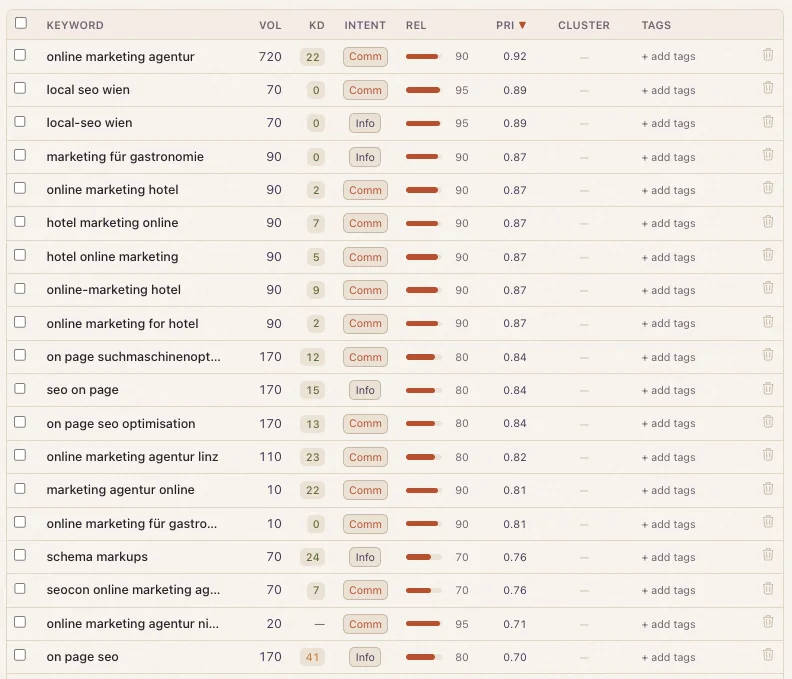
Pick Austria as your market and the table populates with terms like online marketing agentur and local seo wien, real phrasing an Austrian business owner would type, rather than a German-language guess at what an American marketer assumes they'd search. That distinction is the whole point of in-market SEO data. It reflects what a market actually does.
Inside the Keyword View: Every Column Explained
Once you land on the results of your local keyword research, eight columns run left to right. Here's what each one is actually telling you.
Volume, Difficulty, and Cluster
VOL is monthly search volume for that exact phrase, in that exact market. KD is keyword difficulty, a score estimating how hard it is to rank on page one, driven largely by how strong the pages already ranking for that term tend to be, not a guarantee of anything. CLUSTER groups a keyword with its topical siblings, so you're not writing five separate posts for five phrasings of the same idea.
What Search Intent Data Tells You
INTENT is short for search intent data. "Comm" flags commercial intent, someone ready to hire or buy. "Info" flags informational intent, someone still researching. This distinction matters more than volume alone: a high-volume informational term earns you traffic, while a lower-volume commercial term earns you a client.
Relevance and Priority
REL is a 0–100 relevance score, shown as a bar, measuring how tightly the keyword fits your business and not just the market. PRI is priority, a decimal like 0.92, and it's the column the whole table is sorted by, descending, by default. TAGS lets you label each row for your own workflow, with a "+ add tags" action per row so nothing gets lost between research and the content calendar.
Why Keyword Priority Scoring Beats Chasing Volume Alone
Volume tells you how many people search. It doesn't tell you whether they'll convert, how hard you'll have to fight to rank, or whether the term even fits what you sell. That's why sorting by PRI instead of VOL is the smarter default. Keyword priority scoring folds volume, difficulty, intent, and relevance into one number, so the top of the table is genuinely the best place to start writing, not just the loudest.
Look at the Austrian data set. online marketing agentur sits at Pri 0.92, with 720 monthly searches, commercial intent, and a manageable KD of 22. Further down, on page seo pulls the same 170 volume as several rows above it, but its KD jumps to 41, and its priority drops to 0.70 as a result. Same traffic ceiling, worse odds. Keyword priority scoring catches that gap before you spend a week writing for the wrong term.
German Keyword Research in Action: Vienna and Linz
Run a search for Austria and German keyword research stops looking like English research with the words swapped in. local seo wien (Vol 70, KD 0, Comm, Pri 0.89) sits right next to local-seo-wien, the hyphenated version. Same volume, same relevance, but flagged Info intent instead of Comm. Treat them as one keyword and you'll write a page that satisfies neither searcher, because the search intent data says they're looking for two different things.
The table also catches word-order variants: online marketing hotel, hotel marketing online, hotel online marketing, and online-marketing hotel all cluster near Vol 90 and Pri 0.87. It goes local by city too, not just by country. online marketing agentur linz (Vol 110, KD 23, Pri 0.82) is a distinct long-tail opportunity, separate from the Vienna-focused terms sitting above it. A generic English-first list would likely merge or miss half of these variants.
Best Practices for Turning Local Keyword Research Into Content
Start at the top of the Priority column and work down, not sideways across every keyword in the set. Group near-duplicate rows, like the wien and wien-hyphen pair, into one brief only after you've checked their intent actually matches; if it doesn't, they need separate pages. Use TAGS to mark which cluster feeds which piece of content so your writers aren't guessing which brief a keyword belongs to.
Keep language scope realistic, too (a common gap for teams that assume "global" tools cover everything). PostKing authors content in six languages: English, German, French, Spanish, Brazilian Portuguese, and Czech. Build your keyword research inside that boundary rather than assuming coverage for markets outside it.
Next Steps: Build Your Own In-Market SEO Data Set
The Keyword View exists so you stop guessing and start ranking against numbers that actually reflect your market, whether that's Vienna, Linz, or wherever your next campaign runs. Set your target country and language, let the table populate, sort by Priority, and pick your first five rows. That's the entire workflow, and it's how you get local keyword research that produces traffic, not just a spreadsheet nobody opens again.
About Dana Willow
Author
Senior Marketer sharing 15 years of marketing wisdom through an AI lens. Teaching founders to automate smarter.


