Automate Your Social Media Presence: A Small Business Guide to Auto Posting
Boost your small business online with social media auto posting. Learn benefits, top tools, and strategies to automate effectively. Grow your brand today!

Dana Willow
Senior Marketer sharing 15 years of marketing wisdom through an AI lens.
Published on July 16, 2026
Updated on October 9, 2026

Setting up auto posting once saves a small business hours every week.
Key Takeaways
- Save time with automated social media posting
- Increase consistency across all platforms
- Select tools specific to your small business needs
- Avoid common automation pitfalls
Introduction to Social Media Auto Posting
What is Social Media Auto Posting?
Automate, Don't Complicate - social media auto posting is the practice of scheduling and publishing content across multiple platforms automatically, removing the need for manual, real-time uploads every single day. Tools built for this purpose let you plan a week's worth of posts in one sitting. They publish on your behalf, at the right time, without you lifting a finger. The result is a consistent online presence that keeps your audience engaged even when you're focused on running your business.
Why is it Important for Small Businesses?
Time is the scarcest resource for any small business owner. Manual posting fragments your day and pulls attention away from higher-value work.
Auto posting consolidates that effort into one focused session, freeing hours each week. Businesses adopting marketing automation tools report that 63% see increased engagement within the first six months (salesmate.io, 2026).
Benefits for Small Businesses
Grow Your Brand, Not Your Workload - small businesses that automate social media posting reclaim valuable time while maintaining a consistent, professional presence across every channel they serve. Auto posting tools handle the repetitive scheduling work so owners can focus on strategy, customer relationships, and growth. According to salesmate.io, 63% of businesses using marketing automation see increased engagement within the first six months - a result that compounds quickly when a lean team no longer has to post manually every day. That kind of momentum is hard to achieve without the right systems behind you.
- Increased Efficiency: Scheduling a week's worth of content in one sitting beats logging in daily. Small teams cut hours of repetitive work and redirect that energy toward higher-value tasks like product development or customer support.
- Enhanced Brand Consistency: Sporadic posting erodes trust.
A steady, predictable publishing rhythm signals reliability and keeps your audience engaged between purchases or visits. Auto scheduling makes consistency effortless, not a discipline test. - Improved Engagement Rates: Timing matters more than most businesses realize. Auto posting tools publish content when your specific audience is most active, which lifts organic reach without adding ad spend. HubSpot State of Marketing Report confirms that Conversion Rate Optimization - closely tied to engagement - ranks as the second-most-used optimization technique among marketers at 50%, underlining how much results hinge on reaching the right people at the right moment.
These advantages stack fast. Better timing drives more engagement, consistency builds brand authority, and reclaimed hours fuel smarter decisions. For small businesses, automation is not a luxury - it is the operating model that makes competing with larger brands realistic.
Top Tools for Social Media Auto Posting
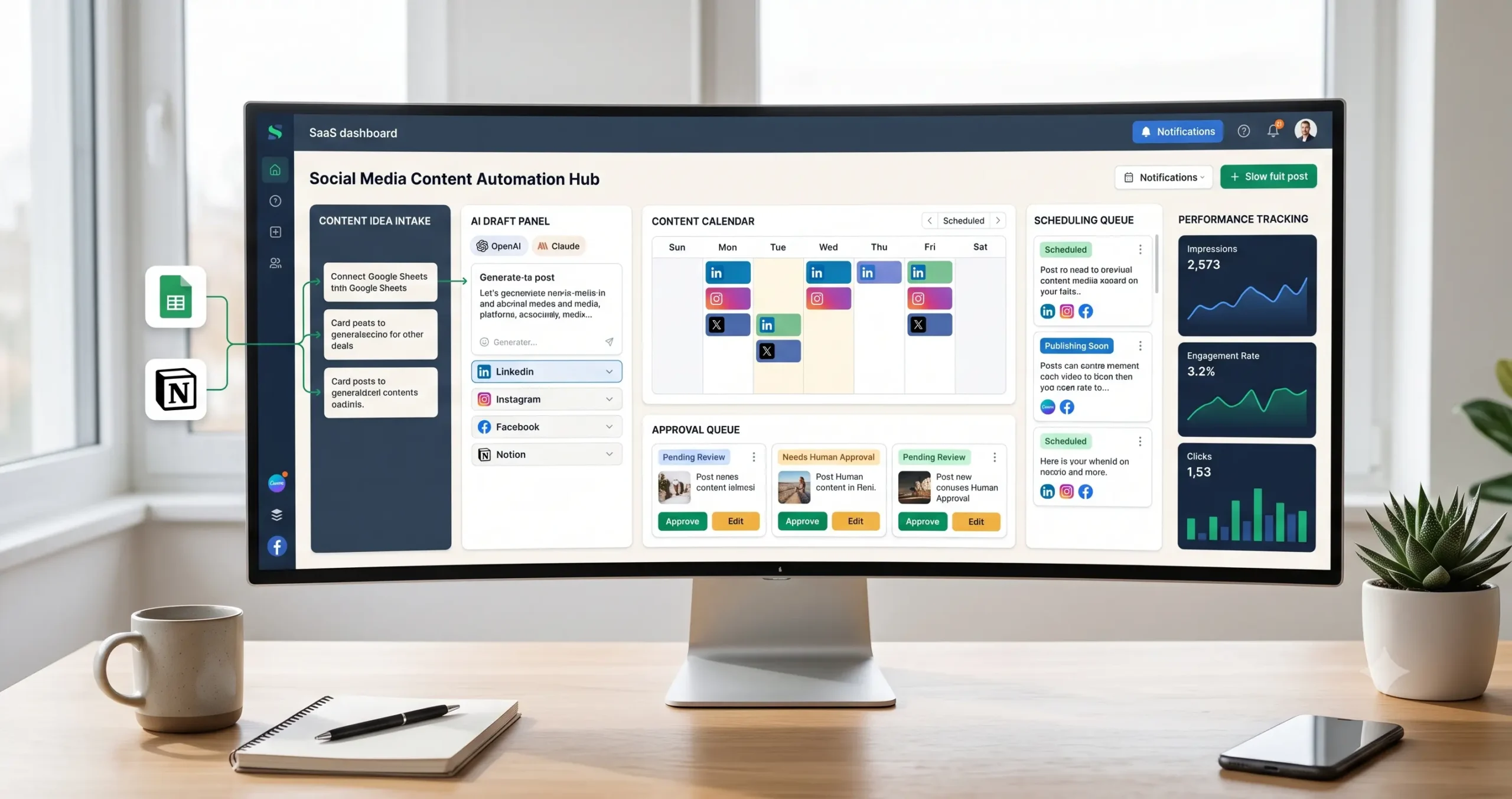
The right tool for your business can mean the difference between a scattered posting schedule and a content engine that runs itself. Social media auto posting platforms have matured rapidly, and today's best options go far beyond simple scheduling. They handle multi-platform publishing, AI-assisted content creation, analytics, and team collaboration - all from a single dashboard. Choosing wisely depends on your business size, budget, and the depth of automation you actually need. With 63% of businesses using marketing automation reporting increased engagement within the first six months (salesmate.io, 2026), the pressure to pick the right platform has never been higher.
Platform Comparison at a Glance
| Tool | Best For | Standout Feature | Pricing Tier |
|---|---|---|---|
| PostKing | Small businesses & creators | AI content generation + auto posting | Free to affordable paid |
| Hootsuite | Agencies & enterprises | Deep analytics & team workflows | Mid to high range |
| Buffer | Solopreneurs & startups | Clean UI & simple scheduling | Low to mid range |
Breaking Down Each Tool
- PostKing: Built lean for lean teams, it combines AI-assisted post creation with automated publishing across major platforms. No steep learning curve. It punches well above its price point.
- Hootsuite: The enterprise heavyweight. It delivers powerful reporting, bulk scheduling, and multi-user permissions.
The complexity and cost make it overkill for solo operators or early-stage businesses. - Buffer: Elegantly simple. Buffer strips away features you likely won't use and focuses on clean queue management and basic analytics. Ideal when you want speed over depth.
Which Tool Should You Choose?
For most small businesses starting out, PostKing offers the strongest value - AI content support removes the blank-page problem entirely. Budget matters, but so does time. A tool you actually use consistently outperforms a premium platform left half-configured.
Hootsuite earns its place when you manage multiple brand accounts with a team. Buffer wins on simplicity. Start with your workflow, then match the tool to it - not the other way around.
Case Study: Success with Social Media Automation
From Manual to Automated: A Small Business Success Story - a regional bakery chain with three locations transformed its online presence by switching from hand-scheduled posts to a fully automated social media workflow, cutting weekly admin time by over four hours. Before automation, the marketing team juggled three separate platform logins, missed peak posting windows, and struggled to maintain consistent branding across channels. Engagement was flat, and follower growth had stalled for nearly a year. The shift changed everything.
They adopted a single scheduling platform, built a two-week content calendar, and let automation handle distribution across Instagram, Facebook, and Google Business Profile. Posts went out at data-driven peak times - without anyone touching a keyboard. Within five months, page reach had doubled and direct-message inquiries about catering orders tripled.
The results align with broader trends. 63% of businesses using marketing automation see increased engagement within the first six months (salesmate.io, 2026).
Those who delay automation often stay stuck in reactive, manual cycles that competitors have long abandoned.
The bakery's lesson is simple: automation didn't replace creativity. It freed the team to focus on it.
Common Pitfalls & Solutions
Avoid the Automation Trap: the biggest mistake brands make is letting tools run on autopilot while human judgment quietly exits the building, leaving audiences with content that feels hollow, repetitive, and easy to ignore. Automation should handle volume and timing - not voice and empathy. When every post sounds like it came from the same script, engagement drops fast and trust erodes even faster.
Over-Automation
Scheduling every post weeks in advance sounds efficient. But rigid queues can't respond to breaking news, trending conversations, or community moments that demand a real reaction.
The fix is simple: reserve at least 20-30% of your posting calendar for real-time, human-crafted content. Automation handles the baseline; your team handles the moments that matter.
- Blind Scheduling: queued posts go live during crises or off-topic events - always monitor the calendar manually
- Repetitive Formats: using the same template repeatedly trains audiences to ignore you - rotate formats weekly
- No Review Loop: automated content with zero human QA produces errors at scale - build in approval checkpoints
Lack of Personal Touch
Audiences spot generic copy instantly. 63% of businesses using marketing automation see stronger engagement only when automation supports - not replaces - authentic communication (salesmate.io, 2026).
Use custom fields, localized references, and brand-specific language in every automated message.
Skip personalization tokens entirely when you can't populate them accurately - a broken "Hi [First Name]" does more damage than no greeting at all.
Step-by-Step Implementation Guide
Your first week with social media auto posting shapes everything that follows - set it up right and the system compounds; rush it and you'll spend months untangling avoidable mistakes. Most marketers underestimate how much a clean foundation matters. 63% of businesses using marketing automation see increased engagement within the first six months (salesmate.io, 2026), but that outcome depends heavily on how carefully the initial configuration is handled. Rushing the setup, skipping audience research, or connecting the wrong accounts first are the errors that quietly erode those results before they ever appear.
Day 1-2: Foundation
Audit every active social account before connecting anything. List the platforms, audience sizes, and content types currently performing. This snapshot becomes your baseline for measuring automation's impact.
Connect one platform first - not all of them. Start with your highest-traffic channel, verify the integration is stable, then expand. Incremental rollouts surface errors before they multiply.
Day 3-4: Content Queue Setup
- Content pillars: Define three to five recurring themes that align with your brand voice
- Post frequency: Set realistic daily limits per platform - quality always beats volume
- Evergreen reserves: Load at least ten evergreen posts to prevent queue gaps
- Media library: Upload pre-approved images and videos so scheduling stays frictionless
- Approval workflow: Assign a reviewer for any post going out in the first two weeks
Day 5-7: Test, Measure, Refine
Schedule a small batch - five to eight posts - and monitor them manually. Check timing, formatting, and link behavior across devices.
Let data correct your assumptions. A single week of real performance feedback outweighs any pre-launch prediction.
By day seven, you should have a live queue, a review process, and at least one round of performance data. That rhythm, built carefully, is what scales.
FAQs about small business owners/marketers
What is the best social media auto posting tool for a small business with a limited budget?
For small business owners and marketers working with a tight budget, the good news is that several powerful social media auto posting tools offer generous free tiers that can get you started without spending a dime. Platforms like Buffer and Later provide free plans that allow you to schedule a set number of posts across multiple social channels each month - more than enough for a business just beginning to automate its social media presence. As your needs grow, their affordable paid tiers scale with you. Beyond cost, ease of use is a key factor to evaluate before committing to any tool. The best auto posting solution for a small business is one your team can actually use confidently without a steep learning curve. Look for an intuitive drag-and-drop content calendar, simple account integrations, and clear analytics dashboards that help you understand which posts are driving engagement. In 2026, many tools also include AI-assisted caption writing and hashtag suggestions, adding even more value at little to no extra cost. Start by signing up for a few free trials, test the scheduling workflow, and choose the platform that feels most natural for your team's day-to-day routine.
Can social media auto posting replace human interaction entirely?
No - and it's important for small business owners and marketers to understand this distinction clearly. Social media auto posting is a powerful efficiency tool, but it is not a substitute for genuine human interaction with your audience. Automated scheduling can handle the consistent delivery of your content, freeing up valuable time in your day, but it cannot respond to customer comments, address complaints in real time, join trending conversations authentically, or build the kind of trust that comes from a real person interacting with your community. Audiences in 2026 are more perceptive than ever, and they can quickly tell the difference between a brand that is truly present and one that is simply broadcasting on autopilot. The most effective strategy for small businesses is a hybrid approach: use auto posting tools to maintain a steady, well-planned content schedule, while dedicating specific time each day - even just 15 to 20 minutes - to monitor notifications, reply to comments and messages, and engage meaningfully with followers and industry conversations. This combination gives you the consistency and time savings of automation alongside the authenticity and relationship-building that only human interaction can provide, resulting in a stronger, more loyal social media following over time.
Avoid These Social Media Auto Posting Mistakes
- Overlooking Audience Segmentation: Failing to segment your audience can lead to generic content that doesn't work.
- Neglecting Content Personalization: Automated content should still feel personal to your audience.
Sources
About Dana Willow
Author
Senior Marketer sharing 15 years of marketing wisdom through an AI lens. Teaching founders to automate smarter.