

Carousel Creator: Swipeable Posts Without Design Work
PostKing 0.2 introduces Carousel Creator: build branded social carousels automatically. Here's what it does, how it works, and who it's built for.

Dana Willow
Senior Marketer sharing 15 years of marketing wisdom through an AI lens.
Published on July 1, 2026
Updated on September 27, 2026

Editing a carousel slide in the Visual Creator with brand colors and card styles applied.
Building PostKing came out of a frustration I know well. You spend months on a product, write a decent launch post, maybe get a few upvotes on Product Hunt, and then... nothing sticks. The content doesn't travel. You're back to square one every week, trying to figure out how to say the same thing in a different format so it reaches someone new.
The problem isn't the ideas. It's the conversion rate between "I have something worth saying" and "it's actually published, formatted, and out there." That gap swallows hours. PostKing 0.2 takes a direct swing at one specific piece of that problem: the carousel.
Why Carousels Matter
Carousels perform. On LinkedIn, multi-slide document posts consistently get more impressions than single-image posts, according to data compiled by the LinkedIn Marketing Blog. On Instagram, the algorithm has favored them for years because they hold attention longer. People swipe, dwell, re-read.
But creating them is tedious in a way that sneaks up on you. You open Canva or Figma, pull a template, realize your brand colors aren't set up, adjust fonts, copy in your text, notice the spacing is off, resize for the platform, export 8 slides, rename them, upload. That's 45 minutes minimum if you're fast. Multiply that by every piece of content you want to repurpose and you've got a part-time job nobody hired you to do.
Indie founders and small teams feel this acutely. You don't have a design contractor on retainer. You can't justify a $200/month tool for one content format. So most people just... don't make carousels. The content sits in a Notion doc and never becomes anything else.
What's New in 0.2
PostKing 0.2 ships the Carousel Creator as its headline feature. The core idea is simple: you give it content, it gives you slides. But the implementation details matter more than the pitch.
Input Flexibility
You can feed it a blog post URL, a chunk of text, or a structured outline. It parses the content and breaks it into carousel-ready segments, respecting natural breakpoints rather than just chopping at word count. Each slide gets a headline and a body excerpt, not a wall of text nobody reads.
Brand Consistency Built In
Your brand settings carry through automatically. Colors, fonts, logo placement, all of it pulls from your PostKing profile. You set it once during onboarding and it applies everywhere. If you're using the PostKing brand defaults, the output follows the terracotta-and-cream palette. If you've connected your own brand kit, it uses yours.
This matters more than it sounds. The reason most automated content tools produce output that feels generic is that they apply their own aesthetic, not yours. A carousel that looks like it came from a template factory undermines the trust you've spent months building with your audience.
Editing a carousel slide in the Visual Creator with brand colors and card styles applied.
Platform Targeting
Slide dimensions and aspect ratios differ across platforms. LinkedIn uses 1:1.294 for document carousels. Instagram favors 1:1 squares or 4:5 portrait. The Carousel Creator exports to the correct spec based on where you're posting. You pick the destination, it handles the math.
Edit Before Export
The output isn't a black box. After generation, you get a slide-by-slide preview where you can reorder, edit copy, swap out a slide's background, or delete ones that don't fit. It's not a full design editor (it's not trying to be), but it covers the 80% of edits that come up every time.
A Practical Example
Say you've written a blog post about onboarding best practices for your SaaS. You paste the URL into Carousel Creator, select LinkedIn as the platform, and hit generate. PostKing reads the post, identifies the 6 most carousel-worthy points, and builds slides: a title card, 5 content slides, and a closing CTA slide.
The CTA slide pulls your product name and site URL from your profile. The title card uses your brand color as the background. Each content slide has your logo in the bottom corner at a set opacity. The whole thing takes under 2 minutes to review and export.
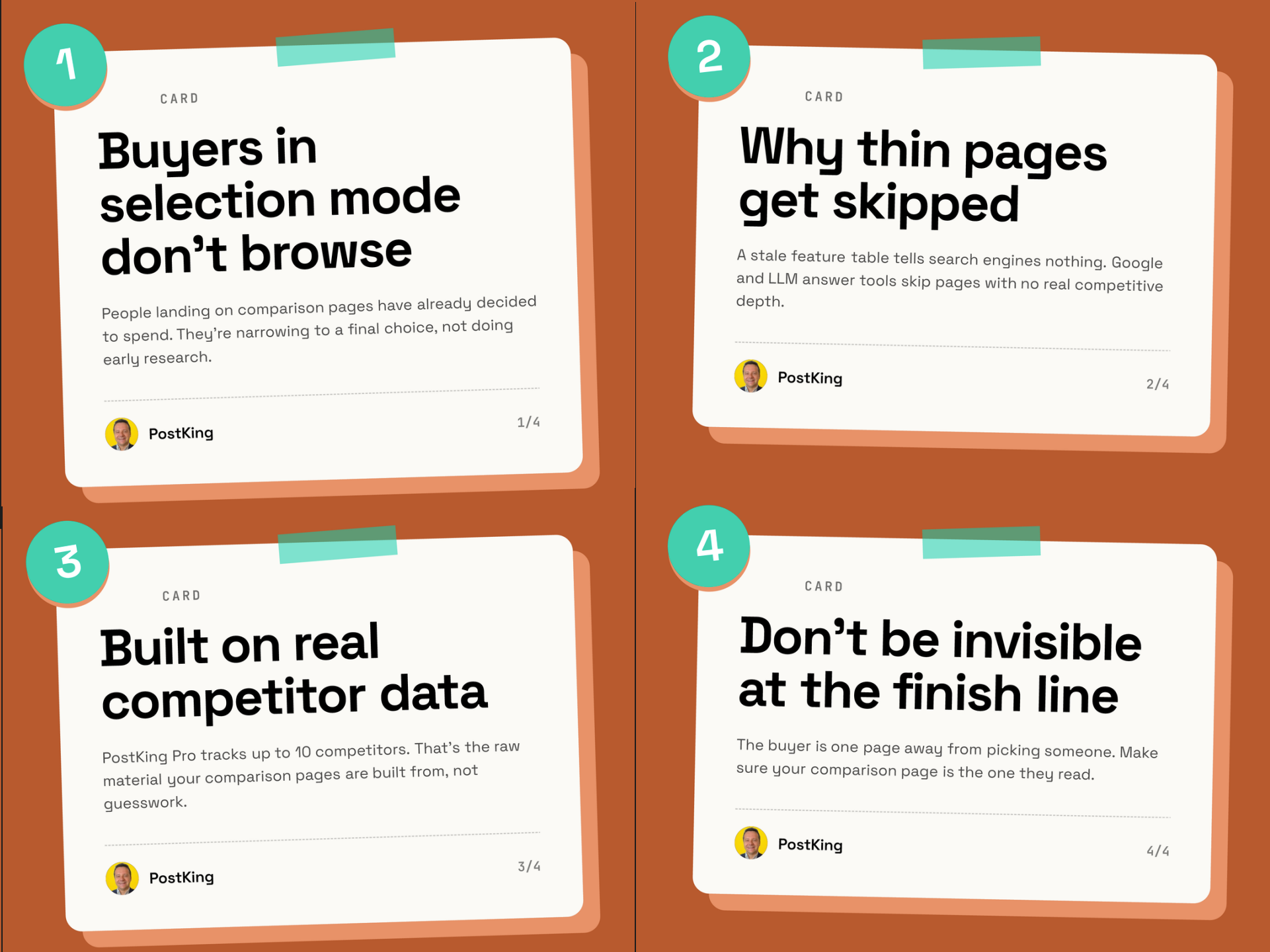 A finished carousel card ready to export.
You could post that carousel the same day you publish the blog post. Same idea, different format, second channel, no extra writing. That's the actual workflow shift this unlocks.
Who This Is Built For
Honestly, the people who get the most out of this are the ones who already have content but haven't been repurposing it. If you've been blogging for a year, you probably have 20 posts sitting there that could become carousels. PostKing doesn't help you figure out what to say. It helps you say what you've already said in more places, faster.
NGOs and nonprofits fit this well too. Many have strong written content (reports, impact stories, program updates) but limited design bandwidth. The Carousel Creator turns a quarterly update into something shareable without needing a graphic designer in the loop.
SaaS teams use it for feature announcements, case study highlights, and changelogs repurposed as educational content. Indie founders use it mostly for thought leadership and founder story content, where the carousel format builds personal brand on LinkedIn in a way that links to articles rarely do.
A Few Things Worth Knowing
The Carousel Creator in 0.2 is first-generation. It works well for text-heavy content that has clear structure. If your source material is very loose or conversational (think a podcast transcript or a casual Twitter thread), the slide segmentation gets messier and you'll spend more time in the edit step. That's something being worked on.
Direct scheduling to LinkedIn and Instagram is live in 0.2. You can export the PDF or push directly to the queue from the preview screen. Instagram carousel scheduling uses the official Meta API, so it's compliant and won't get your account flagged.
According to a 2025 content repurposing study published by the Content Marketing Institute, teams that actively repurpose content across 3 or more formats see meaningfully higher organic reach than those publishing original content on a single channel. Carousels are one of the highest-impact formats for that, particularly for B2B audiences on LinkedIn.
Getting Started
If you're already on PostKing, Carousel Creator is in your dashboard under "Create." You'll see the new option alongside the existing post composer. Make sure your brand kit is filled out before you run your first generation; the output quality improves noticeably when it has real brand data to work with rather than defaults.
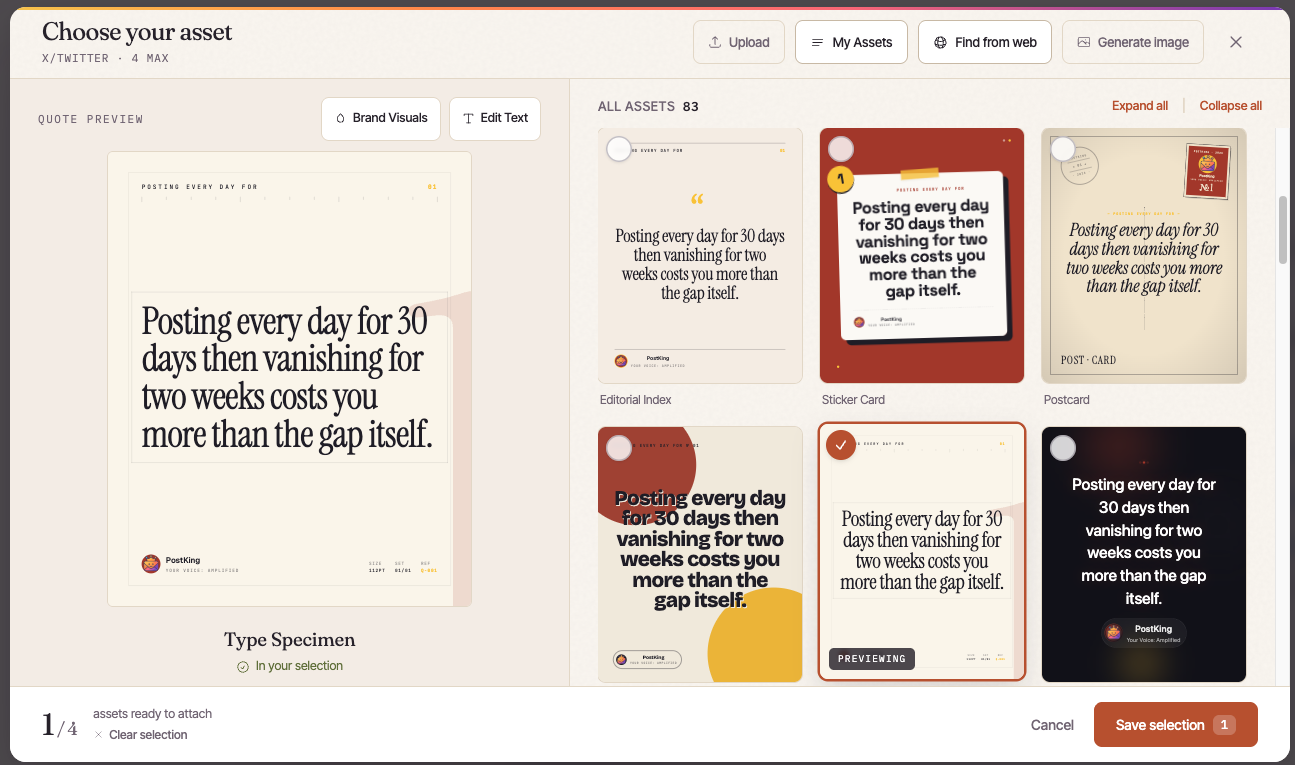 Picking a template and assets for a carousel slide in the asset picker.
If you're new: PostKing starts with a 7-day free trial. The 0.2 update is live now. You can connect LinkedIn and Instagram during onboarding and have your first carousel scheduled within the same session.
The goal was never to make another content tool. It was to close the gap between what you know and what your audience sees. Carousel Creator is one more step toward that.
About Dana Willow
Author
Senior Marketer sharing 15 years of marketing wisdom through an AI lens. Teaching founders to automate smarter.


