

How to Run PostKing Inside Claude Desktop: Close 11 Tabs
PostKing now runs inside Claude Desktop with a 6-line config. No tabs, no context switching. Just talk to Claude, publish content. Here's the setup.

Dite Gashi
10 years of full stack development experience.
Published on March 18, 2026
Updated on July 22, 2026
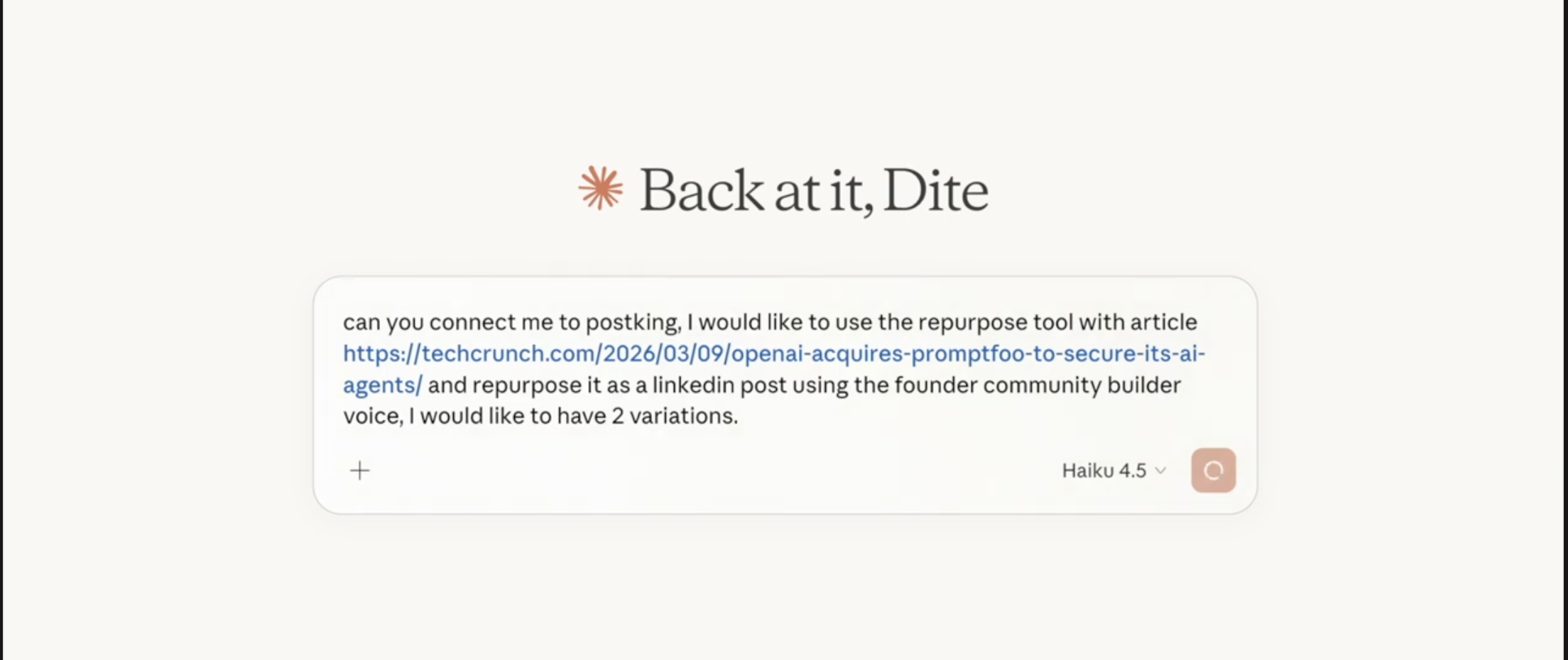
Photo by PostKing Repurpose Tool Prompt
I spent last week testing PostKing's new Claude Desktop integration. The thing that surprised me wasn't the tech (though MCP is clever). It was how much mental overhead disappeared when I stopped switching between Claude, PostKing, my calendar, and whatever else I had open.
Marketing tools multiply until you need a tool to manage your tools. That's backwards.
This just strips it back. Claude becomes your content operator. You talk, it publishes. No interface hunting, no copy-paste loops.
What This Actually Does
PostKing already handles your content calendar, knows your brand voice, stores your visual assets. But you still had to go there, click around, tell it what to do.
Now you stay in Claude. The conversation continues without breaking.
You can say "Generate a week of LinkedIn posts about our new API" and Claude pulls from PostKing, which already analyzed your past content and learned how you write. It drafts posts that sound like you, not like a template.
Or "Repurpose this article for Twitter" and it doesn't just shorten text. It matches the platform's rhythm, pulls relevant images from your asset library, keeps your visual consistency.
Or "Schedule these for Monday morning" and they're queued. No confirmation screens, no "are you sure?" dialogs.
According to McKinsey's 2023 research on generative AI (still relevant in 2026), knowledge workers spend 19% of their time searching for information and context switching. That number drops when your tools talk to each other without you playing messenger.
The Technical Side (It's Simpler Than It Looks)
We built this using MCP, which stands for Model Context Protocol. Anthropic released it so Claude can control external tools without hacky workarounds.
Sounds complex. Feels simple.
You're basically telling Claude "here's a bridge to PostKing, go ahead and use it."
Setup Takes 3 Minutes
Find your Claude config file. On Mac, that's ~/Library/Application Support/Claude/claude_desktop_config.json. Open it and add these 6 lines:
{
  "mcpServers": {
    "postking": {
      "command": "npx",
      "args": ["-y", "postking-mcp"]
    }
  }
}
Save it. Restart Claude Desktop. You'll see a prompt asking you to authorize the connection. Click it. That's the setup.
No API keys to copy, no webhook configurations, no troubleshooting CORS errors at midnight (been there).
Here's what it looks like in action:
In the demo, you'll see the entire flow. Asking Claude for content ideas, watching it generate posts that match existing brand voice, scheduling them across platforms. The whole thing happens in one window.
Why This Matters More Than It Should
I've built products for 10 years. Half that time was figuring out how people actually find what I made. Distribution is harder than building.
Most founders I talk to have the same problem. They know they need consistent content. They've read the articles about showing up daily, building in public, all that. But executing means opening PostKing and keeping Claude open for drafting and checking your calendar and probably three other things.
Each context switch costs you. Not just time, but the mental reset of "okay, where was I, what was I doing, what's the next step."
When everything lives in one conversation thread, you stay in flow. That's not productivity theater. That's actual productivity.
Brand Voice Without Babysitting
PostKing already analyzed your past content when you signed up. It knows whether you use contractions, what topics you care about, how formal or casual you write.
When Claude drafts posts through the MCP connection, it's pulling from that profile. The output doesn't sound generic because the system already spent time learning your patterns.
You still review before publishing (you should always review). But you're editing, not rewriting from scratch.
Research from the Harvard Business Review in 2023 showed that professionals using AI writing assistants spent 40% less time on first drafts but maintained higher quality scores when the AI was trained on their existing work. Same principle here.
What You Can Actually Do
Some specific commands that work once you've got this set up:
"Draft 5 LinkedIn posts about [topic]" and Claude generates them in your voice, ready to schedule.
"Turn this blog post into social content" and it creates platform-specific versions (LinkedIn gets the professional angle, Twitter gets the punchy voice, Instagram gets the visual focus).
"Schedule next week's content" and it distributes posts across your calendar, avoiding time slots you've marked as low-engagement.
"Find images for this post about productivity" and it searches your PostKing asset library, picks relevant visuals, suggests alternatives if nothing matches.
"Analyze what performed well last month" and you get metrics pulled from your connected platforms, formatted as a readable summary instead of a spreadsheet.
You're not learning new commands or memorizing syntax. You're talking. Claude figures out what you mean and handles the execution.
Common Setup Issues (And Fixes)
Most people get this running on the first try. But here's what trips some folks up:
Config file location: On Windows, it's %APPDATA%\Claude\claude_desktop_config.json. On Linux, check ~/.config/Claude/. If the file doesn't exist yet, create it.
JSON formatting: Those brackets and commas matter. If Claude won't restart, you probably have a syntax error. Paste your config into a JSON validator online.
Authorization timing out: The auth link expires after 10 minutes. If you got distracted, just restart Claude again and you'll get a fresh link.
NPX not found: You need Node.js installed. Grab it from nodejs.org, install, restart your terminal, try again.
What This Doesn't Do
This isn't magic. It won't write brilliant content if you give it vague instructions. "Make me go viral" produces garbage. "Draft a LinkedIn post explaining our new API rate limits for technical founders who care about predictable costs" produces something useful.
It also won't replace your judgment about what to publish. Claude plus PostKing can draft, schedule, and publish. You still decide if the message is right.
And it doesn't work without PostKing already having your brand profile set up. If you're new, you'll spend some time feeding it examples of your existing content first. That's not a bug, that's how it learns your voice.
Who This Actually Helps
If you're a solo founder wearing 8 hats, this removes one hat. Content goes from "I'll do that later" to "handled."
If you're running a small team, this keeps everyone in sync without meetings about the content calendar. Claude becomes the shared interface everyone uses.
If you're at an NGO trying to punch above your weight on social media despite having no marketing budget, this gives you leverage. One person can maintain consistent presence across platforms without burning out.
If you're building in public as a growth strategy (which works, I've seen the data), this makes daily posting sustainable instead of exhausting.
Try It This Week
The demo is live now. If you've got PostKing and Claude Desktop, you can set this up before lunch.
Add those 6 lines to your config. Restart Claude. Authorize the connection. Then just start talking to it about your content needs.
You'll know it's working when you realize you haven't opened a browser tab in 20 minutes.
That's the whole point. Marketing shouldn't require 12 browser tabs. Now it doesn't.
About Dite Gashi
Author
10 years of full stack development experience. Had trouble finding distribution - founded PostKing.app in the process.